
How to Connect Amalgam to LeanLaw
Connect LeanLaw to Amalgam to pull your firm’s clients, matters, employees and time entries into your spreadsheets, Claude or ChatGPT. LeanLaw connects with a firm-level API key that you generate in LeanLaw’s settings and paste into Amalgam.
What You Need
Section titled “What You Need”- A LeanLaw login with Firm Setup access. Only these users can generate or manage API keys.
- An Amalgam account.
Generate the Key in LeanLaw
Section titled “Generate the Key in LeanLaw”- Log in to LeanLaw and click the gear icon in the top right to open your firm’s Settings.
- Under Integrations, click API.
- Click Generate API Key.
- Give the key a name such as
Amalgamand save. Copy the key straight away; LeanLaw shows it once.
LeanLaw’s guide: LeanLaw API developer access.
Connect LeanLaw
Section titled “Connect LeanLaw”- Log in at app.amalgam.me.
- Click New Integration and choose LeanLaw. You can type the name in the search box to find it.
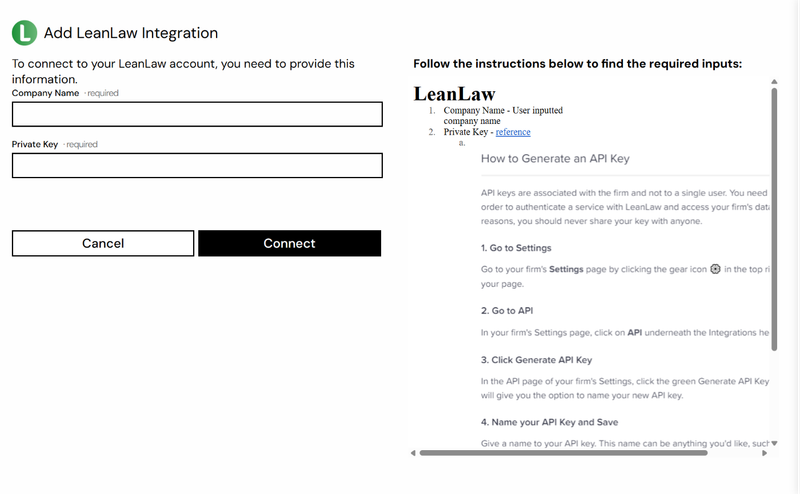
- Enter a Company Name. This is only the display name for the integration in Amalgam, so your firm’s name is fine.
- Paste the key into Private Key and click Connect.

What You Can Pull
Section titled “What You Can Pull”LeanLaw is a read-only integration. Reports include Leanlaw Clients, Leanlaw Employees, Leanlaw Matters and Leanlaw Time Entries. See Reports by Provider.
Good to Know
Section titled “Good to Know”- Deleting a key in LeanLaw stops the integration at once. Generate a new one and paste it in with Edit on the integration in Amalgam.
- The key belongs to the firm, not to one user, so it keeps working if the person who created it leaves.