
How to Connect Amalgam to Stripe
Connect Stripe to Amalgam to pull charges, payouts, invoices and balance transactions straight into your spreadsheets, Claude or ChatGPT. Stripe connects with an API key that you create in the Stripe Dashboard and paste into Amalgam.
What You Need
Section titled “What You Need”- A Stripe login with the Administrator, Super Administrator or Developer role. Other roles cannot see API keys. If you do not have one of these roles, ask an admin to create the key and send it to you securely.
- An Amalgam account.
Get Your API Key From Stripe
Section titled “Get Your API Key From Stripe”- Log in to the Stripe Dashboard and open Developers, then API keys.
- Make sure the dashboard is in live mode, not a sandbox. Live keys start with
sk_live_orrk_live_. - Under Standard keys, click Reveal live key next to Secret key and copy it.
- If you would rather not share your full secret key, click Create restricted key instead, name it
Amalgam, and set Read on Balance transactions, Charges, Customers, Disputes, Invoices, Payouts, Refunds and Subscriptions. Leave everything else at None, then create the key and copy it. Stripe shows a new restricted key only once.
Stripe’s guide: API keys.
Connect Stripe
Section titled “Connect Stripe”- Log in at app.amalgam.me.
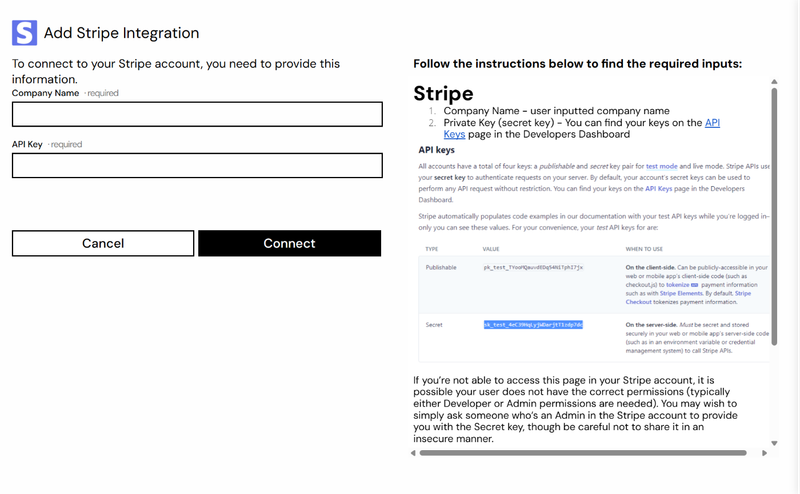
- Click New Integration and choose Stripe. You can type the name in the search box to find it.
- Enter a Company Name. This is only the display name for the integration in Amalgam.
- Paste the key into API Key and click Connect.

What You Can Pull
Section titled “What You Can Pull”Stripe is a read-only integration. Reports include Balance Transactions, Charges, Disputes, Invoices, Payouts, Refunds and Subscriptions. See Reports by Provider for the full list.
Troubleshooting
Section titled “Troubleshooting”- Connect fails right away: check the key is a live key and was copied in full. Test-mode keys (
sk_test_) connect to Stripe’s test data, not your real account. - Reports come back empty: if you used a restricted key, open it in Stripe (the key’s menu, then Edit key) and confirm the resources above are set to Read.
- Rotating the key: if you roll the key in Stripe, open the integration in Amalgam, click Edit, and paste the new key.