
How to Connect Amalgam to Rippling
Connect Rippling to Amalgam to pull payroll, leave and workforce data into your spreadsheets, Claude or ChatGPT. Rippling connects with an API token that you create in Rippling and paste into Amalgam. The Rippling integration is in beta.
What You Need
Section titled “What You Need”- A Rippling admin who can manage API tokens. Super admins and full admins have this. Other users need the Create and manage API Tokens permission for the API Tokens app.
- An Amalgam account.
A token can only see what its creator can see, so create it as an admin with access to the whole company.
Create the Token in Rippling
Section titled “Create the Token in Rippling”- Log in to Rippling. Search for API Tokens in the top search bar, or open Developer, then API credentials (in older menus: Tools, Developer, API Tokens).
- Click New API token.
- Give it a name such as
Amalgamand a unique identifier. The identifier cannot be changed later. Leave the API version at the latest. - Under scopes, pick read access to company, employee (worker), compensation, payroll and leave data. Amalgam only reads from Rippling, so do not pick any read-write scopes.
- Save, then copy the token straight away. Rippling does not show it again.
Rippling’s guide: API tokens.
Connect Rippling
Section titled “Connect Rippling”- Log in at app.amalgam.me.
- Click New Integration and choose Rippling. You can type the name in the search box to find it.
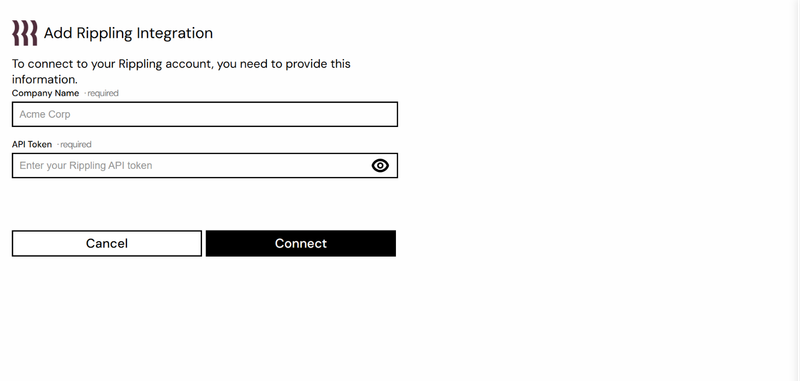
- Enter a Company Name. This is only the display name for the integration in Amalgam.
- Paste the token into API Token and click Connect.

What You Can Pull
Section titled “What You Can Pull”Rippling is a read-only integration. Reports include Payroll Report, Vacation Report and Workforce Information, all in beta. See Reports by Provider.
Good to Know
Section titled “Good to Know”- Rippling revokes a token automatically when its owner leaves the company or when the token goes unused for 30 days. If reports stop working, create a new token and paste it in with Edit on the integration.
- Only the token’s owner can change its scopes.